Upgrading
Supabase ships fast and we try to add all new features to existing projects wherever possible. In some cases, access to new features require upgrading or migrating your Supabase project. It is recommended to upgrade Postgres version to get access to the latest features and fixes.
For scaling your compute size, refer to the Compute and Disk page.
How we upgrade#
The process remains the same for Postgres major and minor version upgrades, as other features and services are also upgraded at the same time.
Free projects will move to the latest minor version when their paused project is restored. Paid projects can't be paused.
The upgrade process is as follows:
- Use the "Upgrade project" button on the Infrastructure section of your dashboard.
- An estimate of the time to upgrade is shown and anything that needs to be addressed before you are eligible to upgrade is shown as a warning. Ensure you have reviewed the caveats section of this document before executing the upgrade.
- Your project is taken offline and the Dashboard shows the upgrade status.
- Behind the scenes, a new instance is created running the latest version of Supabase.
- Your data is copied to the new instance and upgraded using
pg_upgrade. - If the upgrade should fail, your original database would be brought back up online and be able to service requests.
- When the upgrade succeeds, a pg_basebackup is taken and, once complete, your project is available in the Dashboard.
A Supabase project is deployed with a GP3 disk type by default, which will give ~100Mbps when upgrading. Changing the disk type (or increasing IOPS/Throughput) will reduce the time to upgrade.
Using the size of your database, you can use this metric to derive an approximation of the downtime window necessary for the upgrade. During this window, you should plan for your database and associated services to be unavailable.
Upgrade pre-requisites#
When upgrading, a notification will inform you about what is blocking the upgrade process. You need to follow the pre-requisites for the upgrade to successfully complete:
- Projects with read-replicas can't be upgraded. You need to delete the replicas and re-create them after upgrade completes.
pg_upgradedoes not support upgrading of databases containingreg*data types referencing system OIDs. You need to modify the data to not usereg*data types before upgrade.- Logical replication slots must be dropped.
- Deprecated/unsupported extensions must be dropped. Extensions can have dependencies, make sure you backup that data to restore it after the upgrade, with the updated extension version.
Newer versions of services can break functionality or change the performance characteristics you rely on. If your project is eligible for an upgrade, you will be able to find your current service versions from within the Supabase dashboard.
Breaking changes are generally only present in major version upgrades of Postgres and PostgREST. You can find their respective release notes at:
If you are upgrading from a significantly older version, you will need to consider the release notes for any intermediary releases as well.
Pre-upgrade best practices#
- Make sure to discuss with your teams a suitable maintenance window as upgrading involves downtime, this will be crucial for minimising the impact.
- For smaller databases, we recommend taking a logical backup of the data using pg_dump utility. This is to ensure you have sufficient backup before upgrading.
- For larger databases, ensure that a recent backup is in the Backups page in the Dashboard.
- Reduce the size of the data and the number of objects in the database. The time to upgrade highly depends on these factors, and can influence downtime. For example: Archiving data which is not actively used, dropping unused indexes, running vacuum etc. See the Inspect command in the Supabase CLI for a detailed report on space that can be gained, as well as the pg_repack documentation.
Post-upgrade best practices#
- Supabase performs extensive pre- and post-upgrade validations to ensure that the database has been correctly upgraded. However, you should plan for your own application-level validations, as there might be changes you might not have anticipated, and this should be budgeted for when planning your downtime window.
- Analyze logs for any new slow-running queries that may have emerged post-upgrade. This is possible due to the change in data structure during upgrade.
- Verify extension versions, and look for the extensions you need to upgrade.
Caveats#
Custom roles with md5 passwords#
The md5 hashing method has known weaknesses that make it unsuitable for cryptography. As such, we are deprecating md5 in favor of scram-sha-256, which is the default and most secure authentication method used in the latest Postgres versions.
We automatically migrate Supabase-managed roles' passwords to scram-sha-256 during the upgrade process, but you will need to manually migrate the passwords of any custom roles you have created, else you won't be able to connect using them after the upgrade.
To identify roles using the md5 hashing method and migrate their passwords, you can use the following SQL statements after the upgrade:
1-- List roles using md5 hashing method2SELECT3 rolname4FROM pg_authid5WHERE rolcanlogin = true6 AND rolpassword LIKE 'md5%';78-- Migrate a role's password to scram-sha-2569ALTER ROLE <role_name> WITH PASSWORD '<password>';Database size reduction#
As part of the upgrade process, maintenance operations such as vacuuming are also executed. This can result in a reduction in the reported database size.
Disk sizing#
When upgrading, the Supabase platform will "right-size" your disk based on the current size of the database. For example, if your database is 100GB in size, and you have a 200GB disk, the upgrade will reduce the disk size to 120GB (1.2x the size of your database).
Time limits#
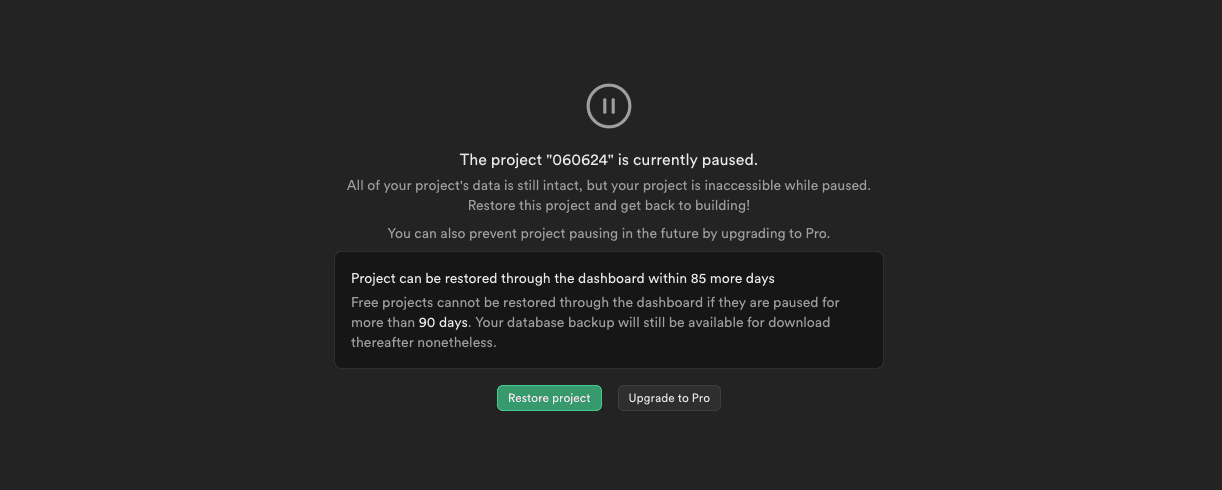
Starting from 2024-06-24, when a project is paused, users then have a 90-day window to restore the project on the platform from within Supabase Studio.
The 90-day window allows Supabase to introduce platform changes that may not be backwards compatible with older backups. Unlike active projects, static backups can't be updated to accommodate such changes.
During the 90-day restore window a paused project can be restored to the platform with a single button click from Studio's dashboard page.
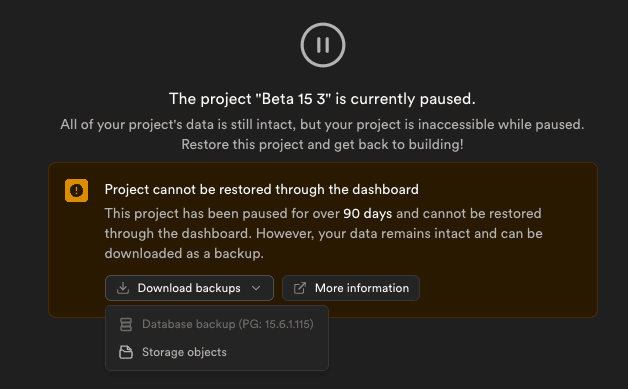
After the 90-day restore window, you can download your project's backup file, and Storage objects from the project dashboard. You can restore the data in the following ways:
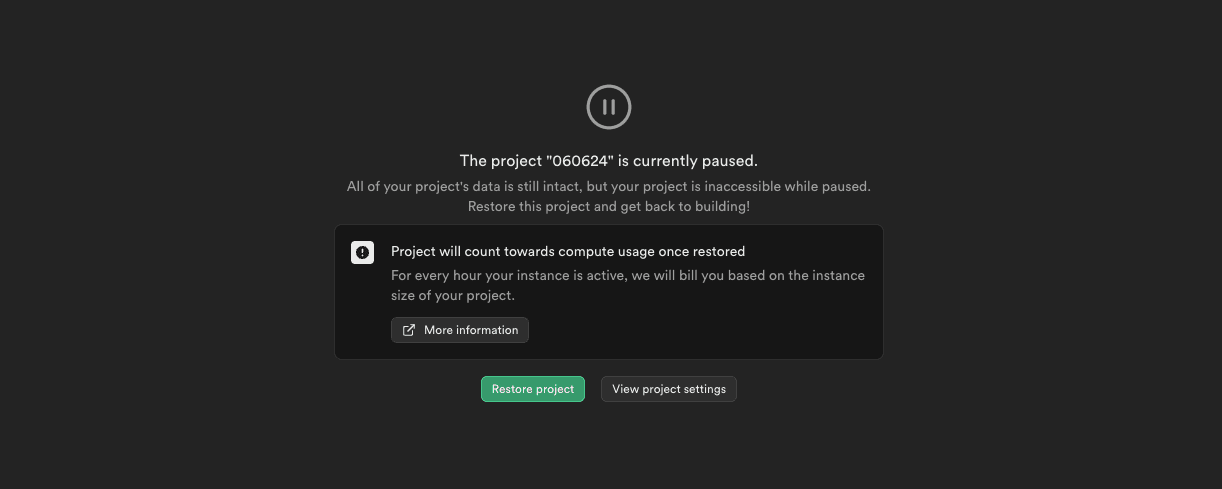
If you upgrade to a paid plan while your project is paused within the 90-day restore window, any expired one-click restore options are reenabled. Since the backup was taken outside the backwards compatibility window, it may fail to restore. If you have a problem restoring your backup after upgrading, contact Support.
Specific upgrade notes#
Upgrading to Postgres 17#
In projects using Postgres 17, the following extensions are deprecated:
plcoffeepllsplv8timescaledbpgjwt
Projects planning to upgrade from Postgres 15 to Postgres 17 need to first disable these extensions in the Supabase Dashboard.
pgjwt was enabled by default on every Supabase project up until Postgres 17. If you weren't explicitly using pgjwt in your project, it's most likely safe to disable.
Existing projects on lower versions of Postgres are not impacted, and the extensions will continue to be supported on projects using Postgres 15, until the end of life of Postgres 15 on the Supabase platform.
pg_cron usage#
pg_cron does not automatically clean up historical records. This can lead to extremely large cron.job_run_details tables if the records are not regularly pruned; you should clean unnecessary records from this table before an upgrade.
During the Supabase project upgrade, the pg_cron extension gets dropped and recreated. Before this process, the cron.job_run_details table is duplicated to avoid losing historical logs. The instantaneous disk pressure created by duplicating an extremely large details table can cause at best unnecessary performance degradation, or at worst, upgrade process failures.
Upgrading to pg_graphql 1.6.0#
Starting with pg_graphql 1.6.0, GraphQL introspection is disabled by default. After the upgrade, queries to __schema and __type will return an error unless introspection is explicitly enabled. See the pg_graphql configuration docs for full details.
This affects tools that rely on introspection:
- Studio's GraphQL inspector (GraphiQL)
- External GraphiQL or GraphQL Playground
- Code generators (e.g.
graphql-codegen) - Relay compiler
- Any tool that calls
__schemaor__typedirectly
Regular data queries (e.g. accountCollection, insertIntoAccountCollection) are not affected.
To re-enable introspection on a schema, run the following SQL in the SQL editor:
1comment on schema public is e'@graphql({"introspection": true})';If your schema already has a comment with other directives (e.g. inflect_names), combine the keys — setting a new comment overwrites the old one:
1comment on schema public is e'@graphql({"inflect_names": true, "introspection": true})';To verify introspection is enabled:
1select graphql.resolve('{ __schema { queryType { name } } }');Existing projects on pg_graphql 1.5.x are not impacted unless they choose to upgrade.