OrioleDB Overview
The OrioleDB Postgres extension provides a drop-in replacement storage engine for the default heap storage method. It is designed to improve Postgres' scalability and performance.
OrioleDB addresses Postgres's scalability limitations by removing bottlenecks in the shared memory cache under high concurrency. It also optimizes write-ahead-log (WAL) insertion through row-level WAL logging. These changes lead to significant improvements in the industry standard TPC-C benchmark, which approximates a real-world transactional workload. The following benchmark was performed on a 8xlarge instance and shows OrioleDB's performance outperforming the default Postgres heap method with a 1.8x speedup.
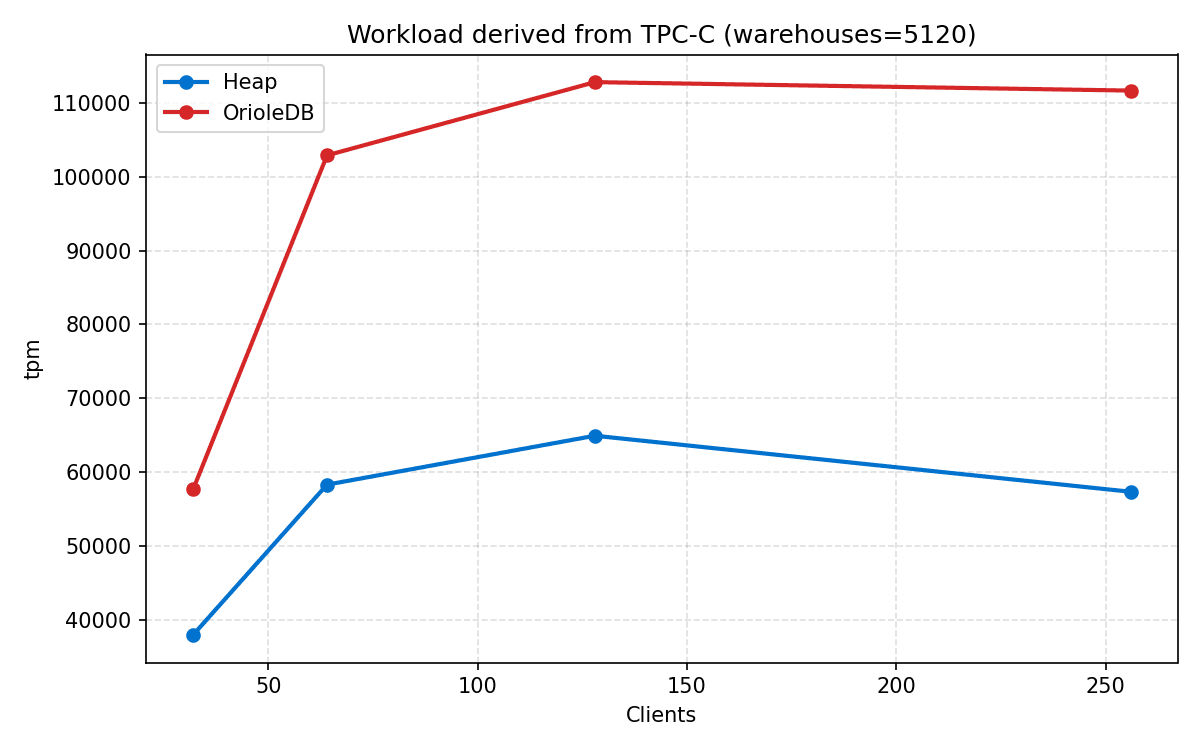
OrioleDB is in public beta, and projects that use it have access to the same paid features as other Supabase projects. OrioleDB has some limitations compared to the default heap storage engine, so review them before you choose it for a project. Native B-tree indexes give the best performance, and an Index Access Method bridge provides experimental support for other index types built for heap storage, including pg_vector's HNSW indexes. In the Supabase OrioleDB image the default storage method has been updated to use OrioleDB, granting better performance out of the box.
Concepts#
Index-organized tables#
OrioleDB uses index-organized tables, where table data is stored in the index structure. This design eliminates the need for separate heap storage, reduces overhead and improves lookup performance for primary key queries.
No buffer mapping#
In-memory pages are connected to the storage pages using direct links. This allows OrioleDB to bypass Postgres's shared buffer pool and eliminate the associated complexity and contention in buffer mapping.
Undo log#
Multi-Version Concurrency Control (MVCC) is implemented using an undo log. The undo log stores previous row versions and transaction information, which enables consistent reads while removing the need for table vacuuming completely.
Copy-on-write checkpoints#
OrioleDB implements copy-on-write checkpoints to persist data efficiently. This approach writes only modified data during a checkpoint, reducing the I/O overhead compared to traditional Postgres checkpointing and allowing row-level WAL logging.
Usage#
Creating OrioleDB project#
You choose OrioleDB when you create a project. You can't add OrioleDB to an existing project or remove it later.
- Create a new Supabase project.
- Expand Advanced Configuration.
- Under Postgres Type, select Postgres with OrioleDB.
- Finish creating the project.
Creating tables#
To create a table using the OrioleDB storage engine, execute the standard CREATE TABLE statement. By default it will create a table using OrioleDB storage engine. For example:
-- Create a tablecreate table blog_post ( id int8 not null, title text not null, body text not null, author text not null, published_at timestamptz not null default CURRENT_TIMESTAMP, views bigint not null, primary key (id));Creating indexes#
OrioleDB tables always have a primary key. If it wasn't defined explicitly, a hidden primary key is created using the ctid column.
Additionally you can create secondary indexes.
OrioleDB tables use native B-tree indexes by default. Other index types built for heap storage, such as pg_vector's HNSW indexes, have experimental support through an Index Access Method bridge.
-- Create an indexcreate index blog_post_published_at on blog_post (published_at);create index blog_post_views on blog_post (views) where (views > 1000);Data manipulation#
You can query and modify data in OrioleDB tables using standard SQL statements, including SELECT, INSERT, UPDATE, DELETE and INSERT ... ON CONFLICT.
insert into blog_post (id, title, body, author, views)values (1, 'Hello, World!', 'This is my first blog post.', 'John Doe', 1000);select * from blog_post order by published_at desc limit 10; id │ title │ body │ author │ published_at │ views────┼───────────────┼─────────────────────────────┼──────────┼───────────────────────────────┼─────── 1 │ Hello, World! │ This is my first blog post. │ John Doe │ 2024-11-15 12:04:18.756824+01 │ 1000Viewing query plans#
You can see the execution plan using standard EXPLAIN statement.
explain select * from blog_post order by published_at desc limit 10; QUERY PLAN──────────────────────────────────────────────────────────────────────────────────────────────────────────── Limit (cost=0.15..1.67 rows=10 width=120) -> Index Scan Backward using blog_post_published_at on blog_post (cost=0.15..48.95 rows=320 width=120)explain select * from blog_post where id = 1; QUERY PLAN─────────────────────────────────────────────────────────────────────── Custom Scan (o_scan) on blog_post (cost=0.15..8.17 rows=1 width=120) Forward index scan of: blog_post_pkey Conds: (id = 1)explain (analyze, buffers) select * from blog_post order by published_at desc limit 10; QUERY PLAN────────────────────────────────────────────────────────────────────────────────────────────────────────────────────────────────────────────────────── Limit (cost=0.15..1.67 rows=10 width=120) (actual time=0.052..0.054 rows=1 loops=1) -> Index Scan Backward using blog_post_published_at on blog_post (cost=0.15..48.95 rows=320 width=120) (actual time=0.050..0.052 rows=1 loops=1) Planning Time: 0.186 ms Execution Time: 0.088 msConfiguration#
Automatic tuning by compute size#
Supabase automatically sizes OrioleDB's memory and worker settings based on your project's compute add-on. These settings control the memory OrioleDB allocates for its internal page pools, undo log, and recovery workers, replacing the role that shared_buffers plays for the default heap storage engine. Supabase also reduces shared_buffers on OrioleDB projects, since OrioleDB tables use their own buffer pools instead.
The following settings are tuned automatically and aren't configurable:
orioledb.main_buffersorioledb.free_tree_buffersorioledb.catalog_buffersorioledb.undo_buffersorioledb.xid_buffersorioledb.logical_xid_buffersorioledb.recovery_queue_sizeorioledb.recovery_pool_sizeorioledb.recovery_idx_pool_sizeorioledb.bgwriter_num_workers
To get larger pools and more recovery workers, upgrade your project's compute add-on. To see the values currently applied to your project, query pg_settings:
select name, settingfrom pg_settingswhere name like 'orioledb.%';User-configurable settings#
A smaller set of OrioleDB settings has a user context and can be changed at the database or role level with SQL, the same way as other customizable Postgres settings.
| Setting | Description | Default |
|---|---|---|
orioledb.default_compress | Default compression level for OrioleDB tables. Set to -1 to disable compression, or 0 to 22 to trade write speed for a smaller table on disk. | -1 |
orioledb.default_primary_compress | Default compression level for the primary index. Accepts the same values as orioledb.default_compress. | -1 |
orioledb.default_toast_compress | Default compression level for TOASTed values. Accepts the same values as orioledb.default_compress. | -1 |
orioledb.serializable | How OrioleDB handles SERIALIZABLE transactions. table_lock acquires a coarse lock per touched table, repeatable_read silently downgrades the isolation level, and error rejects SERIALIZABLE transactions. | table_lock |
For example, to enable compression for new OrioleDB tables in a database:
alter database "postgres" set "orioledb.default_compress" to 1;Compression settings only affect tables and indexes created after you change the setting. Existing tables keep the compression level they were created with.